
Panoptic Scans is a cloud-based vulnerability scanning and management platform. Its capabilities include vulnerability scanning, native Vanta integration, scheduled scans, and vulnerability management. But you’ve already read all that on its website.
You’re here to drive deeper and know how it stacks up against competitors like Intruder.io, Rapid7, and Qualys. To answer that, I’ve tested Panoptic Scans rigorously for days.
This detailed Panoptic Scans review is based on my hands-on experience. Before we read more, here’s the TL;DR version:
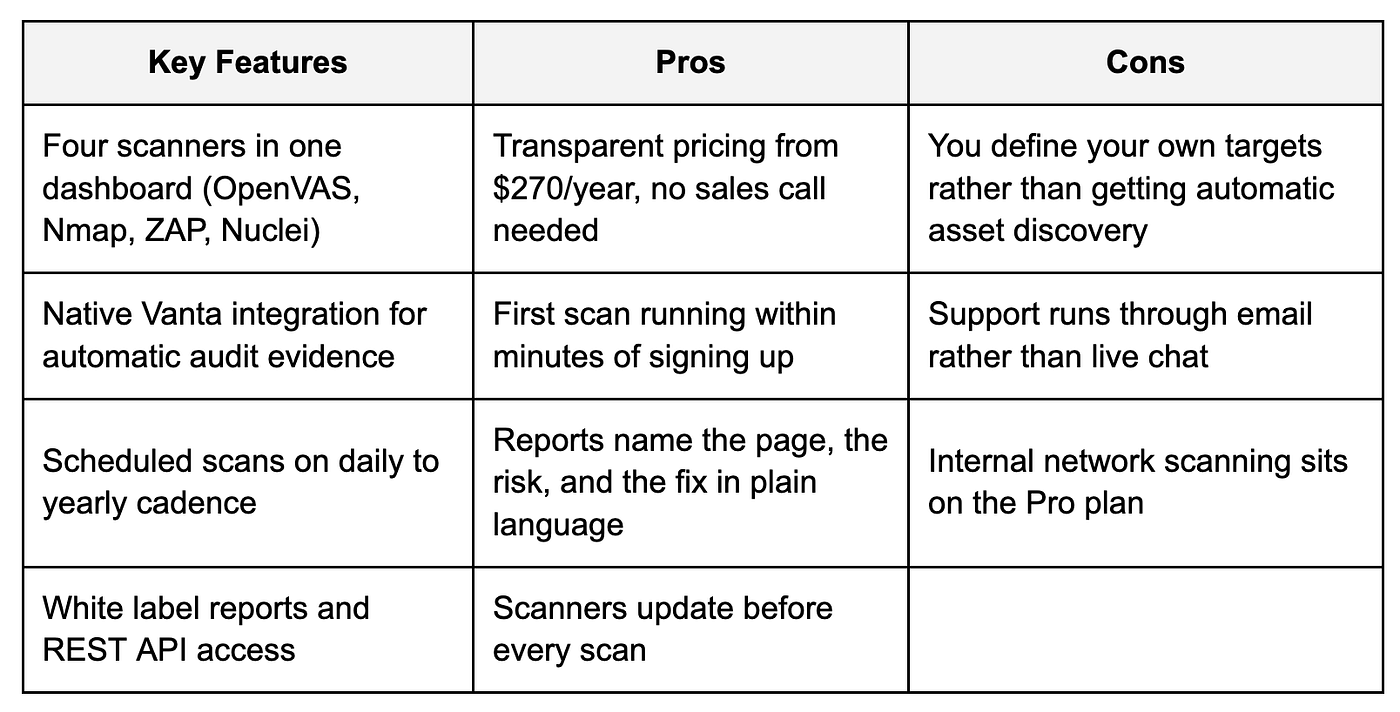
What Is Panoptic Scans?
Panoptic Scans is a cloud-based vulnerability scanning platform that offers security assessment of your applications and networks.
It helps you discover OWASP Top 10 vulnerabilities and various other vulnerabilities in applications and networks along with suggestions to remediate them.
To see what it can actually detect, let’s go scanner by scanner.
1. Open Vulnerability Assessment Scanner (OpenVAS)
Panoptic Scans has made the premier open-source vulnerability scanner, OpenVAS, available via an easy-to-use dashboard. So you don’t have to worry about downloading or installing it.
Anything exposed to the internet can be scanned straight from the dashboard, and if you’re on the Pro plan, a small self-hosted script deployed on your own VM brings internal hosts into scope too.
OpenVAS supports both authenticated and unauthenticated scanning. That means you can identify vulnerabilities in Linux servers, Windows servers, workstations, network infrastructure, databases, and more.
To scan your target, click “New Scan” in the left sidebar and select OpenVAS in the “Scan Type” drop-down.
After submitting the necessary details, click on “Create New Scan.”

Your OpenVAS scan will be queued. Once the scan is complete, you’ll receive a notification by email.
To download the report, go to your Panoptic Scans dashboard. Click the “Scans” on the left sidebar, and you will see the OpenVAS report.

Click on the name of your scan (for example, “My website scanning”). A dialog window opens, letting you choose the file format you want.
You can pick PDF, CSV, or XML, and click on the “Download” button to get the report in your desired format. It’s a quick, flexible way to export your results however it suits you.
The report opens with a summary of what the scan found. Then, host by host, it details every issue discovered.
Each issue comes with a description containing advice to fix the issue. I like the fact that the scan report is built to help users act on the findings.

The overview of each host review includes:
- Severity of Vulnerability (CVSS score)
- Summary, Quality of Detection
- Vulnerability Detection Result
- Solution
- Vulnerability Insight
- Vulnerability Detection Method
- References
Here is what the host review looks like from a downloaded OpenVAS PDF report.

You can also opt for direct access to Panoptic Scans REST API to run OpenVAS network vulnerability scans and retrieve reports.
What’s more, if you’re working as a managed security service provider (MSSP), you can apply your own logo/branding to white label PDF reports.
What I really like about the platform is how little you actually have to do. Panoptic Scans quietly updates OpenVAS before every scan
So you’re always testing against the newest known vulnerabilities without lifting a finger. No chasing updates, no worrying you missed the latest CVEs. It stays current on its own.
For anyone who’d rather focus on fixing issues than maintaining tools, that’s a real win.
2. Nmap
Nmap (short for “Network Mapper”) is a free, open-source tool for network discovery and security auditing.
With Panoptic Scans’ cloud-hosted Nmap scanner, you can scan your targets without installing anything. You have to add your targets in the scan window.
Go to “New Scan”, and select “Nmap” in scan type. After adding the necessary details, click on “Create New Scan.”

Just like with OpenVAS scans, you’ll get an email notification once your Nmap scan is complete. You can get the report by going to the “Scans” section and selecting your scan.
You can download Nmap scan reports in PDF, HTML, TXT, or XML format.
Here’s what an actual Nmap report looks like in Panoptic Scans. I ran this scan against a live web host.
It mapped out 15 open ports, everything from FTP and SSH to a full mail stack and two databases.

But the part I find most useful is the Vulners integration: instead of only listing open ports, it cross-references each detected service version against the CVE database and flags the known vulnerabilities, complete with CVSS severity scores.

It even tags the findings that carry public exploits, so you can immediately spot which weaknesses an attacker could realistically target first.
3. ZAP
Zed Attack Proxy is the open-source DAST engine sitting behind Panoptic Scans’ application scanning.
Rather than reading your source code, it sends real requests to your running app and watches how the app responds.
Setup follows the same path as the other scanners. Go to “New Scan,” select “ZAP” in the scan type dropdown, add your target URL, then click “Create New Scan.”
After you get a notification for scan completion, go to Panoptic Scans and open the scan report by going to “Scans” and then opening the scan details.
It lets you download your ZAP scan report in PDF, HTML, and XML.
I pointed my scan at a live WordPress site. The report came back with 21 alerts spread across four risk levels, led by a single high-risk finding.

The medium severity findings were the ones worth acting on. Eleven pages were missing the header stopping attackers from loading your site inside a hidden frame.
The content security policy was also wide open, letting any script run rather than restricting execution to a defined whitelist.

Every security alert names the problem, the page it appears on, and the exact text ZAP matched. A suggested fix and standard CWE reference number sit at the bottom.

What sold me is the format. Raw scanner output usually needs a security person to interpret it. Here, each alert names the page, explains the risk plainly, and states the fix.
Your developer opens the report and starts working. No translation step, which is where remediation normally stalls.
4. Nuclei
Nuclei works from templates rather than a fixed rule set. Thousands of them come from the security community, covering fresh CVEs within days of disclosure.
Panoptic hosts and maintains the whole thing, so your templates stay current without you touching anything.
Setup matches the other scanners, and a completion notification arrives by email. White label branding is available if you need it.

You can download your Nuclei scan report in PDF and HTML.
Features of Panoptic Scans
During my testing, the following features of Panoptic Scans stand out.
Application Vulnerabilities
Panoptic Scans checks your web applications for the OWASP Top 10, including injection flaws, broken access control, security misconfigurations, and the rest of the categories behind most real-world breaches.
You can run scans in two modes:
- Unauthenticated, which shows you what an anonymous attacker sees
- Authenticated, which tests the logged-in surface area where the most damaging bugs usually hide.
Under the hood, Panoptic Scans uses the Zed Attack Proxy, a widely adopted open-source DAST engine.
And turns its raw output into a clear, concise vulnerability report your developers can act on without needing to be security specialists themselves.
Network Vulnerabilities
Applications are only half your attack surface. Panoptic Scans checks external networks for known vulnerabilities and security misconfigurations, things like exposed services, outdated software, and ports that shouldn’t be open.
Every finding arrives with detailed reporting that explains what the issue is, why it matters, and how to fix it, so remediation is straightforward rather than a research project.
Teams on the Pro plan can extend scanning inside the perimeter to cover internal networks as well, giving you a full picture of both what an attacker can reach from outside and what they’d find after getting in.
Vulnerability Management
Finding vulnerabilities is the easy part; keeping track of them is where vulnerability management programs fall apart.
Panoptic Scans maintains a running record of every known vulnerability across your applications and networks.
So you can see what’s been fixed, what’s still open, and what’s appeared since the last scan. That history matters for third-party risk compliance, where auditors and customers want evidence of continuous monitoring rather than a single point-in-time report.

Instead of going through multiple PDFs every time a security questionnaire lands, you have one place showing your current posture and how it has changed.
AI Attack Narrative
Most scanners hand you a list. Panoptic Scans gives you a story. Include Attack Narrative when you create a scan.
Once the scan finishes, an AI-generated write-up explains how the findings connect, showing the path an attacker could take through your environment rather than leaving you to work it out.
Anyone who has tried explaining a CVSS score to a board member will appreciate this. The narrative slots straight into executive summaries and compliance documentation, and it reads like something a person wrote.
The feature runs on Amazon Bedrock and Claude, and it is available on the Premium and Pro plans.
Easy Vanta Integration
If you’re pursuing SOC 2 or a similar framework, Panoptic connects directly to Vanta and sends your vulnerability scan reports over automatically.
So there is no exporting PDFs, no uploading evidence by hand, and no scrambling the week before an audit to prove you’ve been scanning on schedule.
To connect Panoptic Scans to Vanta, go to “Settings > Integrations” and connect your Vanta account.

Once the integration is configured, each completed scan flows into Vanta as evidence against the relevant controls. And your dashboard stays current without anyone maintaining it.
For small teams where the person running security is also the person running engineering, that removes one of the most tedious recurring chores in the audit cycle.
Scheduled Scans
Compliance frameworks require scanning at a defined frequency. A missed window becomes a gap you’ll have to explain later.
Panoptic Scans lets you set scans to run on whatever cadence your policy calls for: daily, weekly, monthly, quarterly, or yearly.
To schedule a scan, select your desired scan frequency when setting it up. This option is available for all scan types.

Once configured, they run without anyone remembering to trigger them. Email notifications land in your inbox the moment each scan finishes, so results don’t sit unreviewed.
The practical effect is that scan frequency objectives get met by default, rather than by someone’s calendar reminder.
Panoptic Scans Use Cases
Based on my research, here are four key use cases of Panoptic Scans.
1. Meeting Your SOC 2 Network Scanning Requirement
SOC 2 doesn’t just ask whether you scan. It asks how often, across what, and what you did about what you found.
Most early-stage teams run one scan before the audit, hand over a single PDF, and hope nobody asks about the rest of the year.
Panoptic covers both your applications and your networks, external and internal. Set it to monthly or quarterly, whichever your policy commits you to.
And the evidence accumulates without anyone remembering to trigger anything. The vulnerability management view shows what got fixed and what’s surfaced since.
Connect Vanta and the reports are automatically filed.
2. External Surface Monitoring
Your attack surface grows quietly. A developer spins up a staging box and nobody writes it down.
Panoptic maps what the internet can actually reach: open ports, running services, outdated software, plus the web vulnerabilities sitting on top of them.
Schedule it and the picture refreshes on its own. You stop guessing what has changed since last month.
Useful for any team whose infrastructure moves faster than its documentation. Which, honestly, describes most teams these days.
3. Vulnerability Scanning for Managed Security Service Providers
Say you run a regional MSSP with thirty clients on managed IT. Half of them keep asking about security, but enterprise scanning tools price you out before you write the first proposal.
This is where Panoptic fits. You scan customer infrastructure and their internet-facing applications, then hand over reports carrying your own logo instead of somebody else’s.
The API does the heavy lifting once you have volume. Scans get triggered, reports get pulled, and your existing systems stay in charge of the workflow.
4. Testing Your App Before You Ship It
Most application bugs do not show up in code review. They show up when something hits a running app with a payload it was never designed to handle.
Panoptic throws real attack traffic at your live application and reports back on SQL injection, XSS, and the rest of the OWASP list.
The authenticated mode is the part worth paying attention to. Anonymous scans only reach your public pages, while the damaging bugs usually sit behind a login form. Give the scanner credentials and it crawls that surface too.
Reports come back with severity ratings and remediation steps your developers can follow without a security background.
Because the platform is API-first, you can wire scans into your CI/CD pipeline and catch issues before release.
Panoptic Scans Pricing
Panoptic Scans offers three plans, billed monthly and annually. You get 10% off if you choose an annual subscription.
- Basic runs $270 a year and covers 75 targets. You get OpenVAS, Nmap, and ZAP scanning, scheduled runs, and reports by email
- Premium jumps to $810 for 300 targets, adding white label report logos and a detailed attack narrative
- Pro sits at $2,160, stretches to 7,500 targets, and adds the one thing the lower tiers lack: internal network scanning

My take:
Basic is the honest starting point for a SaaS company chasing SOC 2.
The jump to Premium is really about branding and narrative depth, not scan capability.
Pay for Pro when your target count demands it. Or when you need eyes inside the perimeter, because internal scanning is exclusive to this tier.
Panoptic Scans Customer Support
Support runs through one channel here. You email support at panopticscans.com and someone gets back to you.
No live chat, no phone line, no ticket portal to navigate.
Honestly, that suits the product. Panoptic mostly runs itself once your scans are scheduled. So you are not filing tickets every week.
When something does come up, you write to a real inbox instead of fighting a chatbot for twenty minutes first.
Who Should Use Panoptic Scans
Based on my testing and research, Panoptic makes sense for.
- Early-stage SaaS companies chasing SOC 2: You need scanning evidence on a schedule, and Panoptic delivers exactly that without a security hire
- Regional MSSPs: White label reports and API access let you resell scanning under your own name at a price clients accept
- Small engineering teams: When the person handling security also ships features, a tool running quietly in the background wins
- Anyone answering security questionnaires often: One dashboard beats digging through scattered PDFs every time a prospect asks
Who Panoptic Scans Isn’t For
Panoptic will not be the right fit if you fall into these camps:
- Large enterprises with a security operations team: You likely need agent-based scanning, deeper asset discovery, and integrations Panoptic Scans does not offer
- Anyone who wants phone or live chat support: Email works fine most days, though not when you need an answer immediately
- One-off scanners: If you only check a couple of targets twice a year, the free trial covers you
Panoptic Scans vs Competitors
Here is how Panoptic Scans stand against its competitors.

Panoptic wins on price transparency and speed. You see the tiers upfront and scan within minutes. Nessus, Qualys, and Rapid7 all want a sales conversation or a deployment first.
Rivals pull ahead in discovery. Intruder finds new services automatically, while Panoptic Scans checks what you point it at.
For a lean team chasing compliance, that trade is usually worth making. You are buying scanning evidence, not an enterprise asset inventory.
My Verdict
Panoptic Scans is worth your money, and my reasoning is simple.
From sign-up to the first scan took minutes. No demo call, no procurement conversation, no consultant on the invoice.
Pricing sits openly on the website where anyone can read it. Basic runs $270 a year for 75 targets.
Four scanners held up across everything I pointed them at. Nmap mapped 15 open ports and flagged which weaknesses carry public exploits. ZAP returned 21 alerts on a live WordPress site, naming the affected page every time.
Reporting is where Panoptic genuinely separates itself. Every finding arrives ready to act on: location, risk, and remedy in language a developer reads once and understands. The usual gap between scanner output and actual fixes isn’t there.
Trade-offs exist. You define your own targets instead of getting automatic discovery, and support runs through email.
Neither bothered me, because the platform mostly runs itself once scans are scheduled.
First published on Medium.